
More Tech Savvy
  • Home
  • Rates/Specials
  • Testimonials
  • Contact Me
  • Tech Blog

Ready to Upgrade to Windows 10?

8/27/2015

1 Comment

 
Picture
Picture

Should I upgrade now?
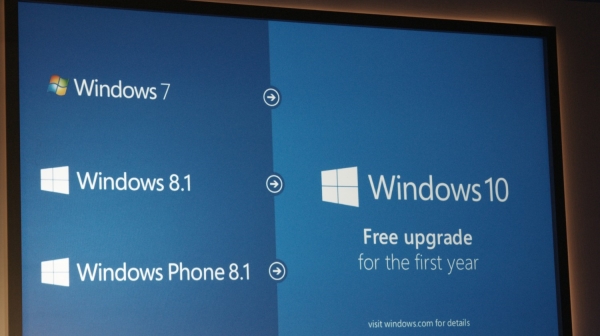
So you have seen the icon pictured to the left, you have heard about Windows 10 and you are asking yourself, "Should I upgrade?" I say a resounding YES!, especially if you did not like Windows 8.
  
Why upgrade to Windows 10? Windows 10 keeps your computer up-to-date, brings back the Start menu, puts your programs/apps on the Start menu and the desktop is back while the confusing Windows 8 start screen is gone. The new web browser, Edge, that comes with Windows 10 is faster and more efficient than Internet Explorer (although it is still being developed). Also, if your computer has a built in microphone, you might like Cortana, the new voice-activated search tool/personal assistant. This article explains some of these new features.

Where do I start?
The upgrade to Windows 10 is pretty straight forward if you follow the instructions from the Upgrade to Windows 10 icon next to your system clock, but I suggest you make sure to do ALL of the following BEFORE you begin your upgrade:
  • Run the "Check Your PC" option in the Get Windows 10 pop up. Here is a list of system requirements for Windows 10
  • Back up each user (C:/Users) onto an external hard drive. You probably do not need to back up public or guest accounts (some exceptions apply)
  • Make sure you have a copy of all software installation discs or files 
  • Create a system repair disc so that you can go back to your original operating system if you choose to/need to

What if I need help?
If all of this makes you nervous, I'd love to help you with your upgrade. It is possible to experience some "surprises" as you upgrade to Windows 10, but this is common with any operating system upgrade and most potential issues can be worked through. Enough Windows 10 upgrades have taken place that there is a plethora of information online to troubleshoot issues that may come up.  Please contact me and let me give you a quote to help upgrade your particular system to Windows 10. My services include:
  • Walking you through all of the preparation steps listed above
  • Upgrading your operating system
  • Making sure your computer is working and you can find your programs and data
  • Making sure your printer (1 printer) is working after your upgrade
  • Sharing a few Windows 10 tips to get you started

Should I upgrade now?
I say "Yes, and I'll be glad to help! I think you'll be glad you did."
1 Comment

Office 2010 Starter Edition Quit Working?

9/28/2013

0 Comments

 
Picture
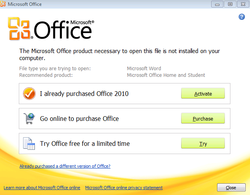
I had two customers contact me this week because they were suddenly unable to open Microsoft Word and Microsoft Excel documents even though they had legal copies of Microsoft Office 2010 Starter Edition which they had been using for some time. Clients could open Word and Excel and then browse to the file they wanted to open with no problem, but if they double-clicked on a Word or Excel file to open it, they saw the menu shown to the left asking if they wanted to purchase the full version of Office 2010 or start a trial (which would have quit working at the end of the trial period). They also noticed that their Word and Excel icons had changed. 

After a bit of hit-and-miss online research, I was able to find that a September 2013 Microsoft update had changed the file associations for Word and Excel files, so the files no longer pointed to their version of Office to open the files. The solution is simple...re-associate the file extensions to Office Starter Edition. 

Here is a link to a Microsoft site explaining the problem and how to re-associate the file extensions.

0 Comments

Recovery Discs Will Save Your Bacon

8/9/2013

1 Comment

 
Picture
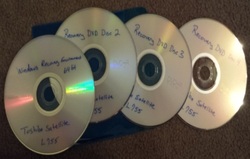
These 4 DVDs saved a MoreTechSavvy client a lot of money today. Minimally, they saved $30 plus shipping because they did not have to buy these Recovery Media discs from Toshiba. Many computer manufacturers do not offer the option to buy a backup copy of the recovery media for a computer. In that case, this client would have been out $90 or so for  a Windows 7 license.

What are recovery media discs? 
When you buy a new computer, often times the computer's hard drive will have a hidden "rescue partition" which you can access through various keystrokes. You would access this partition if you needed to factory reset your computer...get it back to the original condition it was when you brought it home.  This is a handy feature, unless the hard drive on your computer crashes making it impossible to access the rescue partition. This is what happened to a client I am helping today, but fortunately for them, when MoreTechSavvy sets up a new computer for a client, I always create recovery discs. This is an option computer manufacturers give you to save your bacon if the hard drive on your computer crashes! When my client told me their hard drive crashed, all I had to do was remove the hard drive from the computer, buy a new one, plug it in, turn on the laptop, put in the first recovery disc and follow instructions. Right now the client's laptop is finishing its installation and the computer will soon be in the exact condition it was when it was purchased new. The copy of Windows will be registered and legal and I will be able to re-install the programs they had on their computer previously.

How are recovery discs made?
Most new computers ask you to make a a backup copy or to create recovery media when you go through the initial Windows setup. My new Windows 8 laptop actually let me put my recovery media on a USB stick instead of DVDs. If I ever have to restore that computer, all I will have to do is plug in the USB stick, turn on the computer and follow the instructions. If your computer does not ask you to create recovery media when you do your initial Windows setup, check the paperwork that came with your computer. If all else fails, Google "create recovery media {name and model of your computer}". Of course, you can always contact MoreTechSavvy for further help!

Avoiding the Worst Case Scenario
Recovery media is like a backup copy of your operating system. It will save you time and money allowing you to start fresh after some sort of disaster (BAD virus, crashed hard drive, etc). Manufacturers used to send these discs out with new computers, but now it's up to you. Like all backup plans, creating recovery media is preparing for a "worst case scenario". If you have a backup, the worst case can be avoided.

1 Comment

Grovo

7/26/2013

0 Comments

 
Picture
I know I am not the only one this has happened to. I'm on YouTube following a video link and when the video is over and I'm given a screen full of other videos to watch. There's always at least one that catches my attention. And so I watch a second video, only to be presented with more options. Before I know it, I've watched 30 minutes of videos.

The same thing happened to me when I discovered Grovo. I think my first 60 second instructional video was about some feature of Gmail that I wanted to learn more about. I watched the video and then saw all of the other Gmail instructional videos Grovo offered, and so I watched another. At some point, I got on their email list and that is where things started getting out of control. Grovo sends an email with a sampling from many different tracks they offer: Facebook, Chrome, Gmail, Box, Dropbox, Google Drive, Office 365, Blogger, Boomerang, CraigsList, Spotify, Skype, iTunes, LinkedIn, iPhone Tips and Tricks, Firefox, Feedly...well, just check them all out here. I haven't even scratched the surface!

So I started watching videos...for free. Yup, Grovo offers a TON of free videos.  Since then, I have been given access to their Pro account which opens up the entire 3,500 video library to me. What an incredible resource! I started watching the videos as a way to learn some new tips and tricks for the web sites/tools I already use, but as I got into it I realized the potential to help clients of my small computer side business. I can learn about other sites my clients may be using so that I can help them. I'm also looking into way to use the free Grovo videos to helpothers with online tools they would like to become more familiar with. Grovo is also set up to help companies train entire teams. With each video being just 60 seconds long followed by a couple quiz questions to help make sure you understood the material, this site is sure to help anybody regardless of the "geek abilities".

0 Comments
Forward>>

    Author

    Hi, I'm Rob and I run More Tech Savvy. You won't find me behind the tech desk at a major retail store...I come to your home and help you remove a virus, install a printer or show you how to better use your computer for your home business. If I'm able to help you and you're pleased with my work, I ask you to tell your friends about my services. 

    This blog is dedicated to tools/sites that I use and I believe are worth sharing with others. I hope you will find something here that will be useful to you.

    Archives

    June 2021
    July 2018
    April 2016
    March 2016
    November 2015
    October 2015
    September 2015
    August 2015
    September 2013
    August 2013
    July 2013

    Categories

    All

    RSS Feed